
Dermatology

Automated total body imaging with integrated body mapping

Capture both Standard and Cross-Polarized studio-quality photos of the entire body in under 2 minutes.

Product
IntelliStudio

The new 3rd generation IntelliStudio sets the highest standard for image quality that rivals dermoscopy.
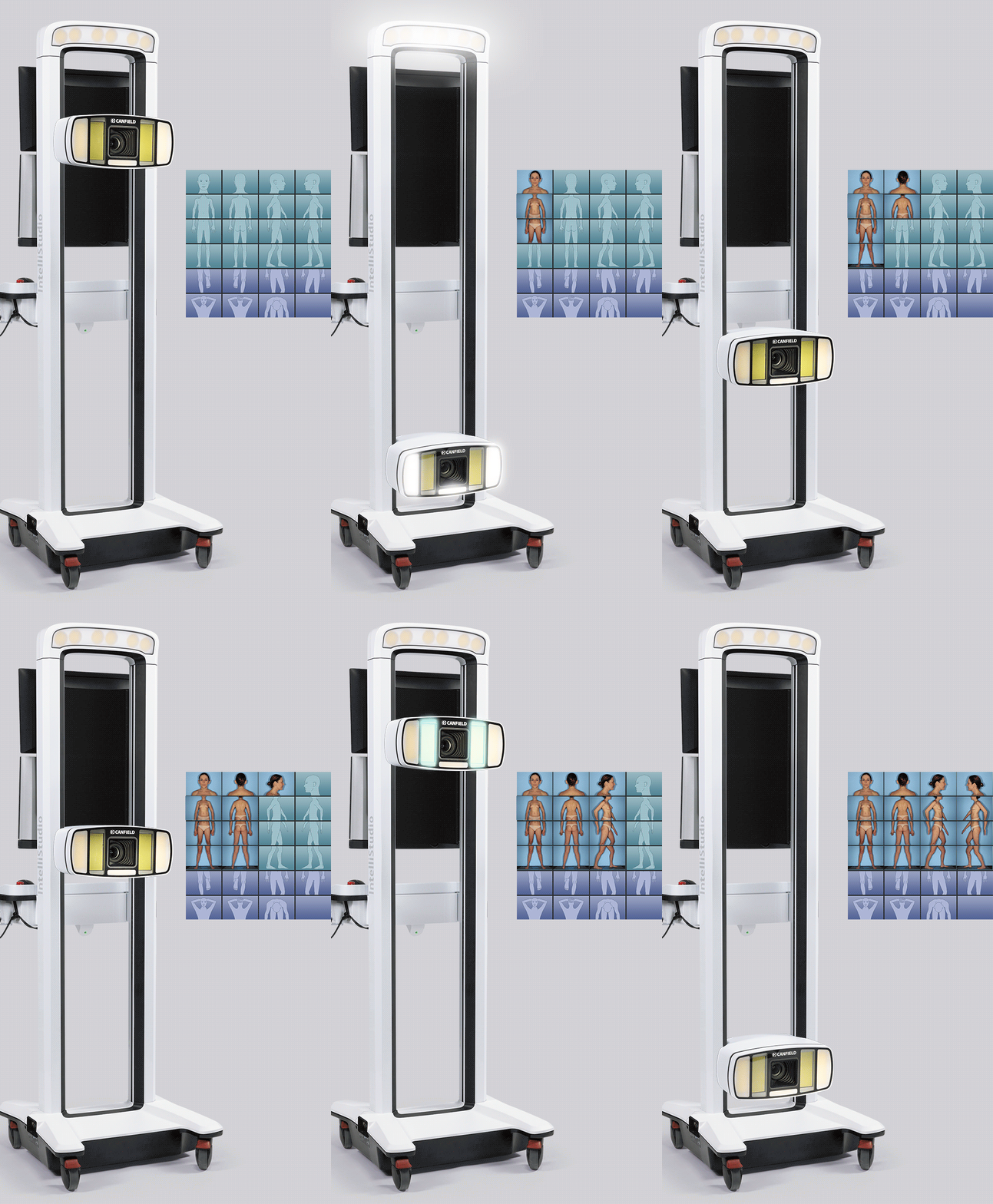
Image 1
IntelliStudio

The new 3rd generation IntelliStudio sets the highest standard for image quality that rivals dermoscopy.

Motorized programmable lift ensures repeatable camera positions and lighting.

Standardized templates control camera settings and guide patient poses.

Automated sequencing guides the user through captures - no special photography skills needed.

Non-polarized and cross-polarized lighting reveals skin features. Both lighting modes are captured sequentially in less than a second, enabling perfect registration.

Image 1

DermaGraphix capture templates control camera settings and guide patient poses, while the motorized programmable lift ensures repeatable camera positions and lighting for consistent whole body photography with minimal staff training.

DERMOSCOPY REIMAGINED

Achieve consistent and standardized imaging, ensuring reliable documentation and precision in every capture.

  • Unrivaled image quality
  • Most efficient workflow
  • Sequential cross-polarized, non-polarized and UV capture
  • Capture both clinical and dermoscopy images
  • Award winning design
Image 1

IntelliStudio

What Our

Tech Specs &

IntelliStudio

System Power
  • 100-120V AC, 50/60 Hz, 10.0A or
  • 220-240V AC, 50/60 Hz, 10.0A
  • Class I Laser
    • IEC 60825-1:2014
    • Max output of laser radiation is less than 10mW
Capture Computer
  • Configured and supplied by Canfield. Computers from other suppliers are not supported.
Consultation Computer Recommendations (not supplied)
  • Operating system
    • Windows 11 Professional 64 bit
    • NOT SUPPORTED: Windows Home Edition
  • Processor: Intel Core i7 (or i9/Ultra 9, 13th Gen or higher recommended)
  • System memory (RAM): 16 GB minimum (32GB or higher recommended)
  • Minimum 4 GB available disk space for installing application
  • Minimum 1 TB available disk space recommended for data
  • Graphics card
    • 4 GB dedicated memory minimum (or higher)
    • Dedicated nVidia or AMD cards (nVidia Highly Recommended)
    • Driver: latest available
    • 3.0 or later Open GL
  • Display: 1920 x 1080 (FHD) minimum; 3840 x 2400 (4K) maximum (max 200% scaling)
  • Microsoft Security Essentials anti-virus software recommended
  • Wired printers (recommended for speed)
  • 1 Gbps Ethernet connection for networking - Wifi not supported
  • Capture computer to run VECTRA camera must be purchased directly from CANFIELD
Mac computer requirements (consultation only - not supplied)
  • Mac hardware: 2020 or newer
  • Operating system: macOS Sequoia and Tahoe
  • Processor: Apple M1 (or higher recommended)
  • System memory (RAM): 16 GB (or higher)
  • Minimum 2 GB available disk space for installing application
  • Minimum 500 GB available disk space recommended
  • Graphics card: M1 (or higher recommended)
  • Display: 13-inches or larger with resolution of 1920 x 1080 or greater
  • Optional: 1 Gbps wired LAN connectivity (remote DB access not supported over Wi-Fi)
Software
  • IntelliStudio® Capture Module
  • DermaGraphix® Module
  • Mirror® PhotoFile®
  • Mirror® PhotoTools
Server / Network Guidelines (not supplied - Minimum recommendations)
  • Windows Server 2019 64-bit or 2022 64-bit
  • Microsoft SQL Server 2019 or 2022 (Express edition is installed by default)
  • 2.2 GHz or faster processor
  • 16GB system memory (RAM)
  • 1 Gbps wired LAN connectivity (Wi-Fi not supported)
  • 1 Terabyte HDD, minimum. Space required is dependent upon patient volume, camera used, and settings.
  • RAID 1 - NOT SUPPORTED
  • Regularly scheduled backups are highly recommended.
Notes
  • Server class OS not supported as a workstation
  • WAN Connectivity is NOT supported
  • Workstation based cloud licensing
  • Space required dependent upon patient volume
    • XP and NP bodymap photos with ten D2 dermoscopy images (XP, NP, UV): 3 GB; 333 sessions per TB
    • XP (only) bodymap photos with ten D2 dermoscopy images (XP, NP, UV): 2.3GB; 445 sessions per TB
  • A minimum of 1 Gbps network speed is required to access the storage location of the live copy of the data (10 Gbps recommended). Wi-Fi is not supported for workstation connectivity
  • Maximum 25ms latency required to the storage location of the live copy of the data
  • Anti-virus exceptions must be put in place to avoid any latency
  • SSD Storage is highly recommended
  • Cloud storage (Azure, AWS, Google Cloud, Etc.) is not supported for storing data, but can be used for backup purposes
  • RAID 1 is not supported
  • The Machines/PC/Server where the Canfield services are running must have a static IP address
  • In a networked environment, the services(s) need to run with a dedicated service account where the password does not expire, and it has access to the DB and the images folder

IntelliStudio Stationary

Stationary IntelliStudio
  • Includes All-in-One PC for easy Desktop or cart placement
  • Adjustable feet to level with any floor
  • Real panel with anchoring points
  • Standardized templates streamline acquiring consistent and repeatable image sets.
  • Capture templates guide patient poses and control camera orientation, zoom, and flashes for friction-free studio photography.
  • Canfield's MatchPose® assures follow-up images are perfectly registered to baseline.
Room Recommendations
  • Please note – Ceiling height must be greater than 7ft (2.13m)
  • 1Gigabit/second connectivity or higher (highly recommended)
  • To achieve the best and most consistent results, the wall in front of which the patient will stand should be painted prior to installation and training. This is only recommended, not necessary.
  • Recommended Paint Color: Home Depot Behr 550D-5 Ocean Cruise – Flat Finish
  • No additional studio lights are required. Standard room lighting is sufficient.
  • The ethernet port is located on the left side of the machine along with the systems main power cable. It is highly recommended to have data and power outlets for the PC to the left of the intended space.
  • The PC is powered through the IntelliStudio system. External power is only needed to the IntelliStudio and an optional added dermatoscope.
Consultation Computer Recommendations (Not Supplied)
  • Operating system:
    • Windows 11 Professional 64 bit
    • NOT SUPPORTED: Windows Home Edition
  • Processor: Intel Core i7 (12th Gen or higher recommended)
  • System memory (RAM): 16 GB or higher
  • Minimum 2 GB available disk space for installing application
  • Minimum 1 TB available disk space recommended for data
  • Graphics card:
    • 4 GB dedicated memory minimum (or higher)
    • Dedicated nVidia or AMD cards (nVidia Highly Recommended)
    • Driver: latest available
    • 3.0 or later Open GL
  • USB Ports: 2 dedicated ports (USB 2.0)
  • Display: 1920 x 1080 (FHD) minimum; 3840 x 2400 (4K) maximum
  • Microsoft Security Essentials anti-virus software recommended
  • Wired printers (recommended for speed)
Server / Network Guidelines (not supplied - Minimum recommendations)
  • Windows Server 2019 64-bit or 2022 64-bit
  • Microsoft SQL Server 2019 or 2022 (Express edition is installed by default)
  • 2.2 GHz or faster processor
  • 16GB system memory (RAM)
  • 1 Gbps wired LAN connectivity (Wi-Fi not supported)
  • 1 Terabyte HDD, minimum. Space required is dependent upon patient volume, camera used, and settings.
  • Regularly scheduled backups are highly recommended.
  • Maximum 25ms latency required to the storage location of the live copy of the data
  • Anti-virus exceptions must be put in place to avoid any latency
  • SSD Storage is highly recommended
  • Cloud storage (Azure, AWS, Google Cloud, Etc.) is not supported for storing data, but can be used for backup purposes
  • RAID 1 is not supported
Notes
  • Server class OS not supported as a workstation
  • WAN Connectivity is NOT supported
  • Workstation based cloud licensing
  • Space required dependent upon patient volume
    • XP and NP bodymap photos with ten D2 dermoscopy images (XP, NP, UV): 3 GB; 333 sessions per TB
    • XP (only) bodymap photos with ten D2 dermoscopy images (XP, NP, UV): 2.3GB; 445 sessions per TB
  • A minimum of 1 Gbps network speed is required to access the storage location of the live copy of the data (10 Gbps recommended). Wi-Fi is not supported for workstation connectivity
  • Maximum 25ms latency required to the storage location of the live copy of the data
  • Anti-virus exceptions must be put in place to avoid any latency
  • SSD Storage is highly recommended
  • Cloud storage (Azure, AWS, Google Cloud, Etc.) is not supported for storing data, but can be used for backup purposes
  • RAID 1 is not supported
  • The Machines/PC/Server where the Canfield services are running must have a static IP address
  • In a networked environment, the services(s) need to run with a dedicated service account where the password does not expire, and it has access to the DB and the images folder

CANFIELD CARE®

  • Unlimited expert technical assistance
  • Remote diagnostic service
  • Advanced hardware exchange
  • Marketing support
  • Remote training
  • Unlimited Webinars ($250 value per webinar)
  • ViewMyConsult® client portal
  • Extended Canfield Care is available
  • On-site training: Additional on-site training by Canfield experts is available.
  • Contact Canfield or your Canfield Authorized Distributor for pricing and additional information.